Stop losing work in chat. Start organizing it.
Stop losing work in chat. Start organizing it.
Join the teams who turned their conversations into their competitive advantage
Join the teams who turned their conversations into their competitive advantage
Join the teams who turned their conversations into their competitive advantage
Set up in 5 minutes. Cancel anytime.
Set up in 5 minutes. Cancel anytime.
Get Started Free - No Credit Card
Get Started Free - No Credit Card
File Library
The File Library collects every file shared inside the Hub images, videos, documents, spreadsheets, PDFs, and ZIP files.
Anything uploaded in chat is automatically organized here so your team never loses track of important assets.
The File Library collects every file shared inside the Hub images, videos, documents, spreadsheets, PDFs, and ZIP files.
Anything uploaded in chat is automatically organized here so your team never loses track of important assets.
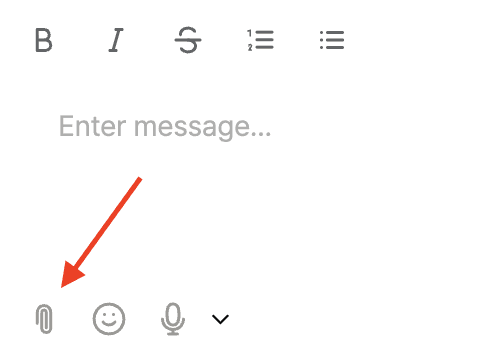
Image & Video Library
At the top of the File Library, you’ll find a dedicated section for all visual assets.
What you can do:
View all shared images (PNG, JPG) and PDFs in a thumbnail gallery
Click any image to open MAKi’s dedicated viewer
Use image feedback tools (markup → to-do creation → AI image generation)
This makes MAKi ideal for design reviews, approvals, and quick visual communication.
Image & Video Library
At the top of the File Library, you’ll find a dedicated section for all visual assets.
What you can do:
View all shared images (PNG, JPG) and PDFs in a thumbnail gallery
Click any image to open MAKi’s dedicated viewer
Use image feedback tools (markup → to-do creation → AI image generation)
This makes MAKi ideal for design reviews, approvals, and quick visual communication.
Image & Video Library
At the top of the File Library, you’ll find a dedicated section for all visual assets.
What you can do:
View all shared images (PNG, JPG) and PDFs in a thumbnail gallery
Click any image to open MAKi’s dedicated viewer
Use image feedback tools (markup → to-do creation → AI image generation)
This makes MAKi ideal for design reviews, approvals, and quick visual communication.
Image & Video Library
At the top of the File Library, you’ll find a dedicated section for all visual assets.
What you can do:
View all shared images (PNG, JPG) and PDFs in a thumbnail gallery
Click any image to open MAKi’s dedicated viewer
Use image feedback tools (markup → to-do creation → AI image generation)
This makes MAKi ideal for design reviews, approvals, and quick visual communication.
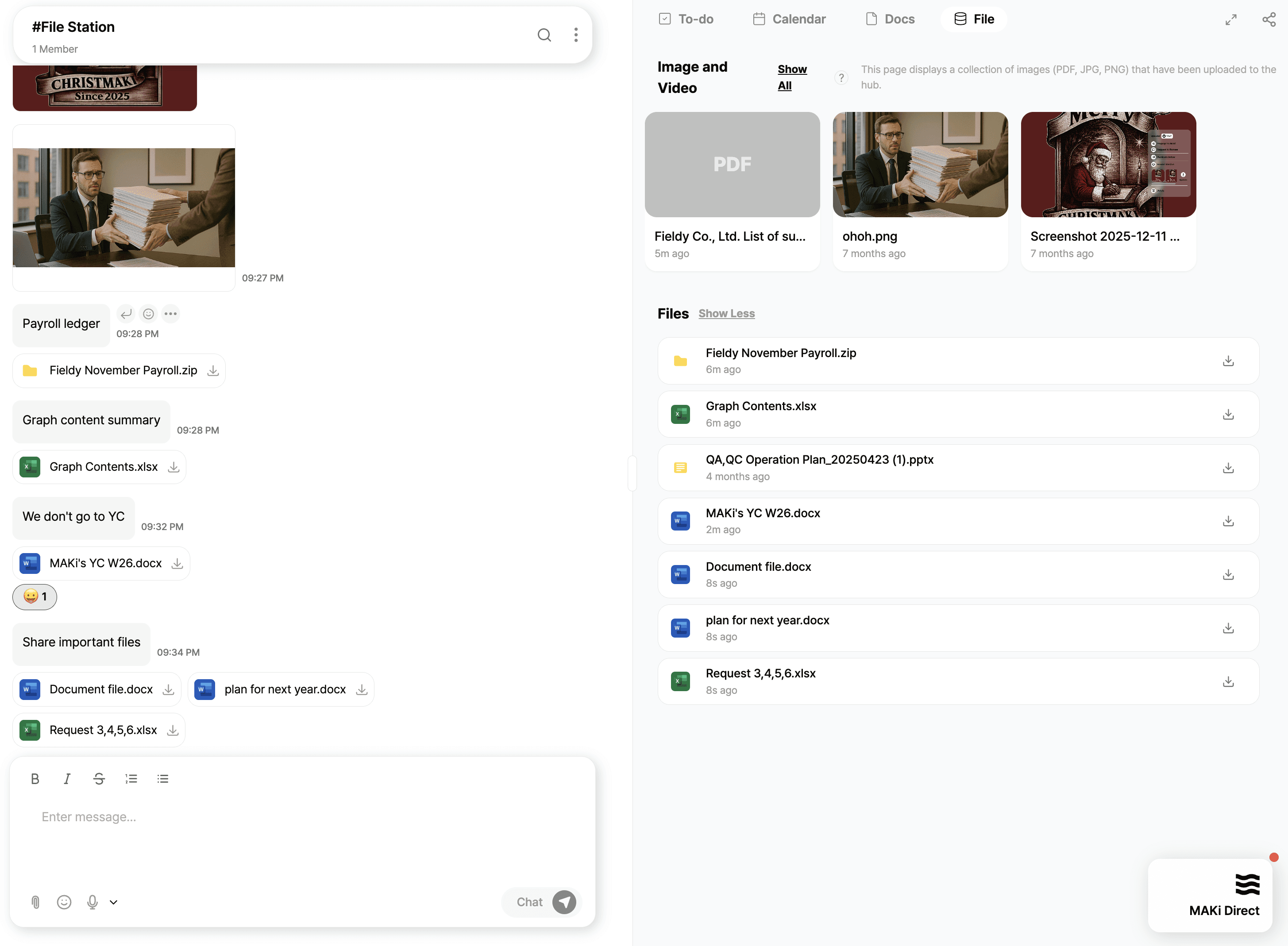
Document & File Repository
Below the visual gallery, MAKi lists every file uploaded in chat, including:
Word files (DOCX)
Excel spreadsheets (XLSX)
PowerPoint (PPTX)
ZIP folders
PDF documents
Each item displays:
File type icon
File name
Upload time
Quick download button
Files appear instantly in the library the moment they are shared in conversation.
Document & File Repository
Below the visual gallery, MAKi lists every file uploaded in chat, including:
Word files (DOCX)
Excel spreadsheets (XLSX)
PowerPoint (PPTX)
ZIP folders
PDF documents
Each item displays:
File type icon
File name
Upload time
Quick download button
Files appear instantly in the library the moment they are shared in conversation.
Document & File Repository
Below the visual gallery, MAKi lists every file uploaded in chat, including:
Word files (DOCX)
Excel spreadsheets (XLSX)
PowerPoint (PPTX)
ZIP folders
PDF documents
Each item displays:
File type icon
File name
Upload time
Quick download button
Files appear instantly in the library the moment they are shared in conversation.
Document & File Repository
Below the visual gallery, MAKi lists every file uploaded in chat, including:
Word files (DOCX)
Excel spreadsheets (XLSX)
PowerPoint (PPTX)
ZIP folders
PDF documents
Each item displays:
File type icon
File name
Upload time
Quick download button
Files appear instantly in the library the moment they are shared in conversation.
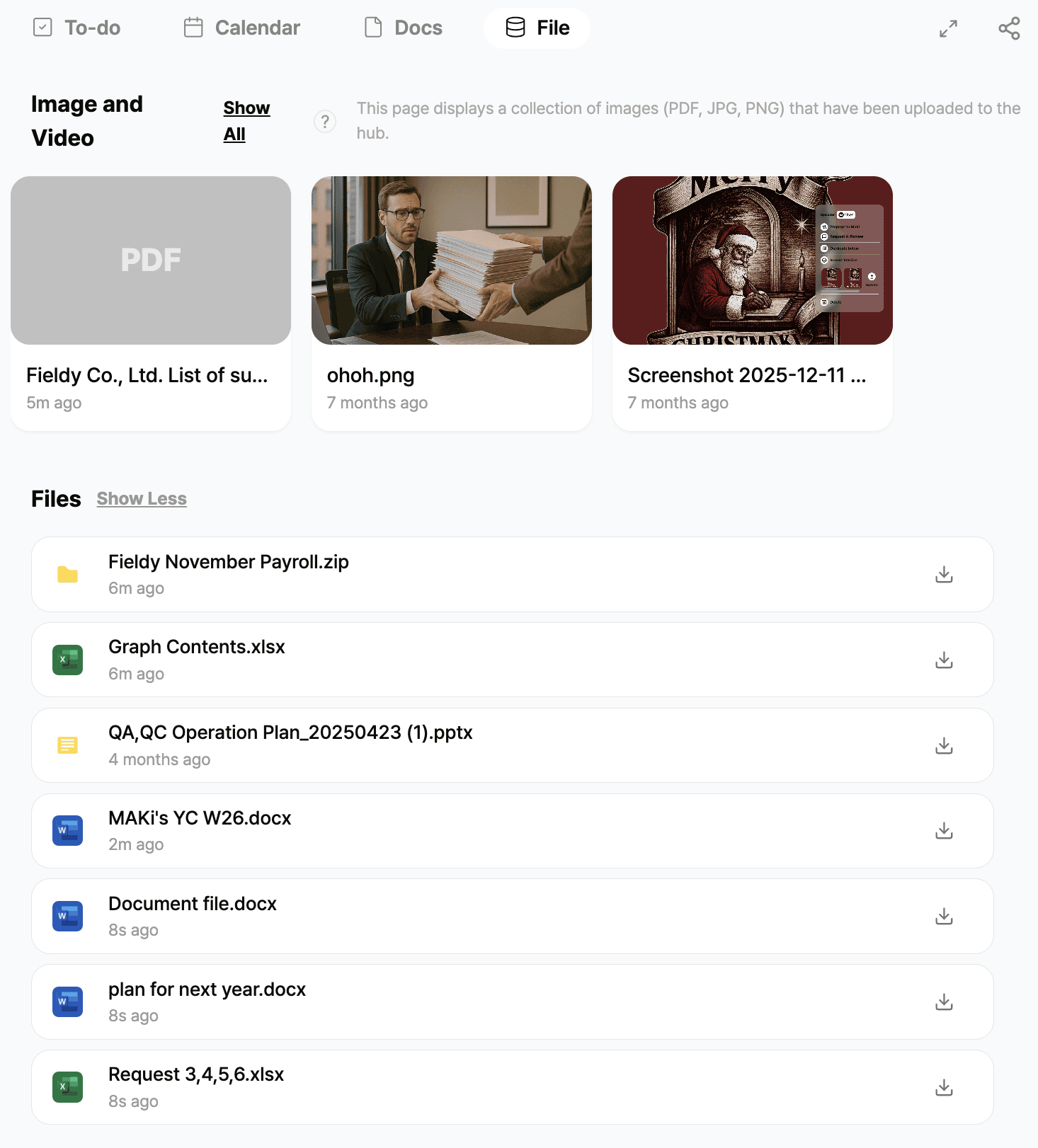
How the File Library Works With Chat
Every file sent in chat:
Appears as a message bubble
Is automatically saved into the File Library
Is categorized into the correct section (Image/Video vs. Files)
This ensures:
No duplication
No manual uploading
No losing documents in chat history
You always have a clean, searchable archive.
How the File Library Works With Chat
Every file sent in chat:
Appears as a message bubble
Is automatically saved into the File Library
Is categorized into the correct section (Image/Video vs. Files)
This ensures:
No duplication
No manual uploading
No losing documents in chat history
You always have a clean, searchable archive.
How the File Library Works With Chat
Every file sent in chat:
Appears as a message bubble
Is automatically saved into the File Library
Is categorized into the correct section (Image/Video vs. Files)
This ensures:
No duplication
No manual uploading
No losing documents in chat history
You always have a clean, searchable archive.
How the File Library Works With Chat
Every file sent in chat:
Appears as a message bubble
Is automatically saved into the File Library
Is categorized into the correct section (Image/Video vs. Files)
This ensures:
No duplication
No manual uploading
No losing documents in chat history
You always have a clean, searchable archive.
Stop losing work in chat.
Start organizing it.
Join the teams who turned their conversations
into their competitive advantage
Set up in 5 minutes. Cancel anytime.
Get Started Free - No Credit Card