Stop losing work in chat. Start organizing it.
Stop losing work in chat. Start organizing it.
Join the teams who turned their conversations into their competitive advantage
Join the teams who turned their conversations into their competitive advantage
Join the teams who turned their conversations into their competitive advantage
Set up in 5 minutes. Cancel anytime.
Set up in 5 minutes. Cancel anytime.
Get Started Free - No Credit Card
Get Started Free - No Credit Card
To-do Detail
Tasks Created in Chat Appear in the Right-Side Data Bucket
When you convert a message into a To-do:
It instantly appears in the Data Bucket
No need to open a new window
No need to leave the conversation
No need to manually organize anything
Tasks Created in Chat Appear
in the Right-Side Data Bucket
When you convert a message into a To-do:
It instantly appears in the Data Bucket
No need to open a new window
No need to leave the conversation
No need to manually organize anything
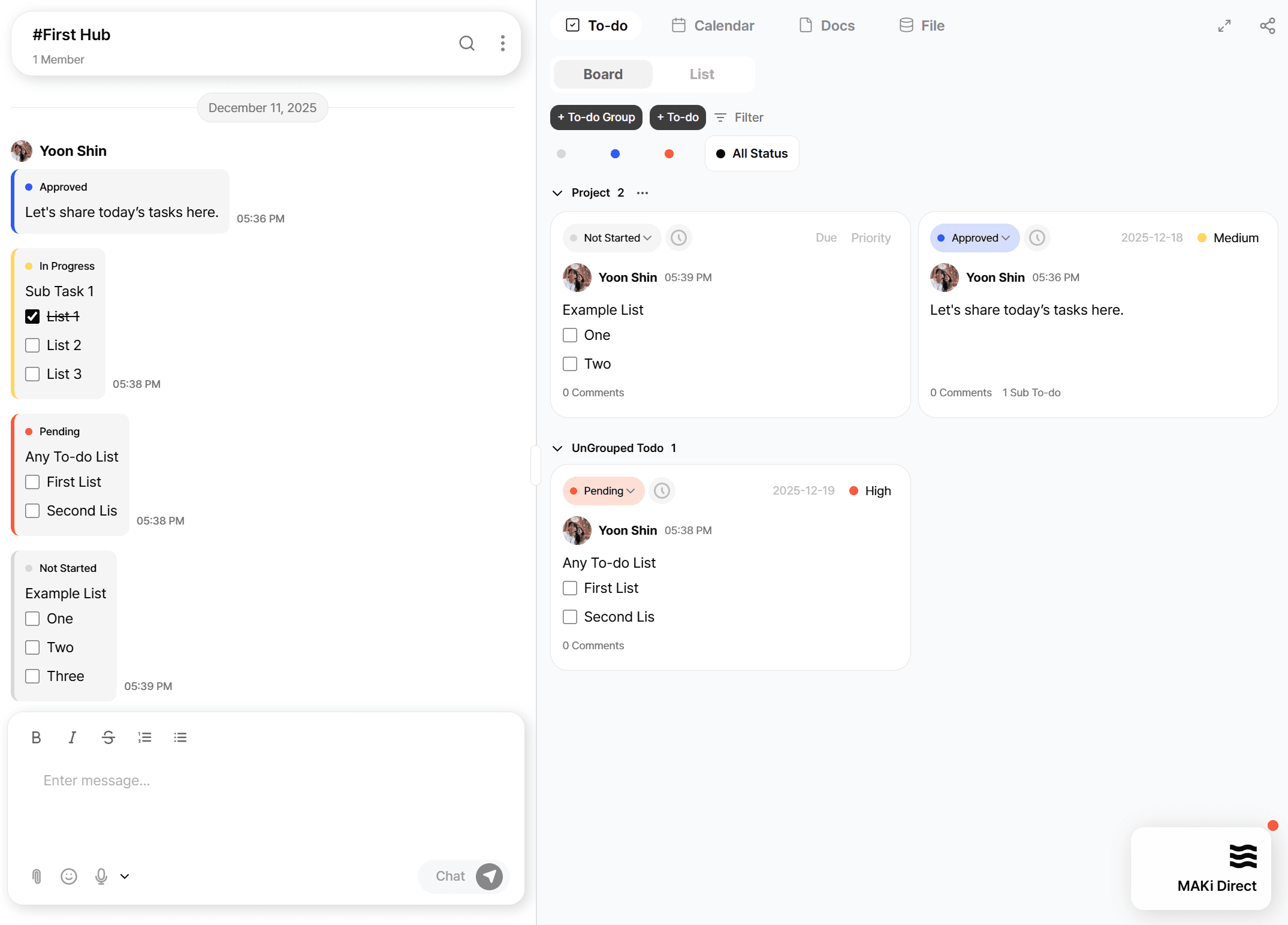
Click Any Task in the Data Bucket to Open Its Detail View
Inside the detail view, you can:
Edit the title
Assign a member
Add a due date
Add priority
Add tags
Upload files
Write notes
See linked conversation context
Any changes are immediately reflected in all views (board/list/calendar).
Click Any Task in the Data Bucket to Open Its Detail View
Inside the detail view, you can:
Edit the title
Assign a member
Add a due date
Add priority
Add tags
Upload files
Write notes
See linked conversation context
Any changes are immediately reflected in all views (board/list/calendar).
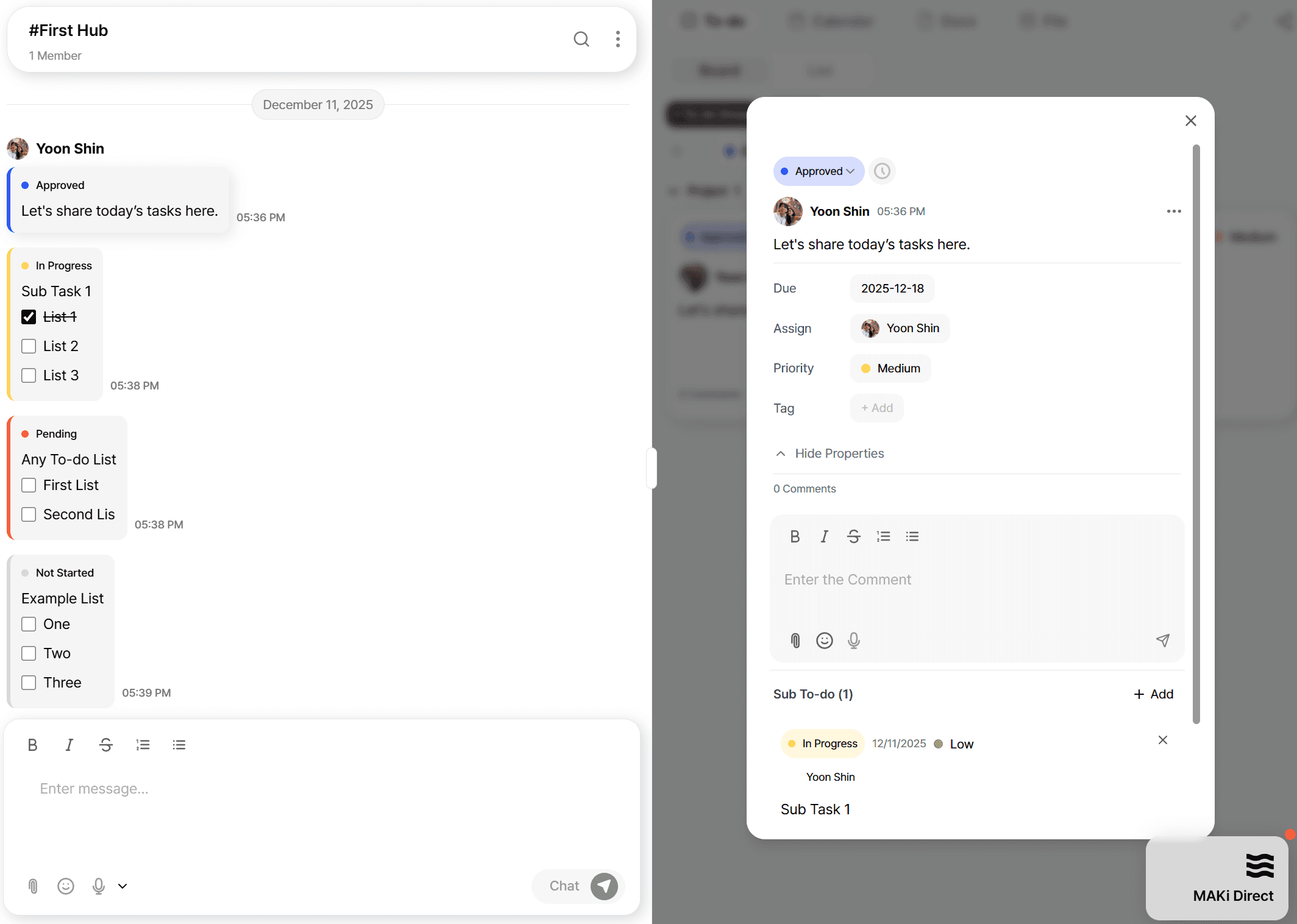
Add Subtasks From the Detail View
MAKi allows you to add Subtasks directly within the To-do detail panel.
Subtasks are ideal for:
Breaking down larger tasks
Assigning specific steps
Adding work items that do not naturally belong to any Hub or separate ticket
Handling multi-step workflows
"Subtasks live inside the parent task — they don’t need their own Hub or board."
Add Subtasks From the Detail View
MAKi allows you to add Subtasks directly within the To-do detail panel.
Subtasks are ideal for:
Breaking down larger tasks
Assigning specific steps
Adding work items that do not naturally belong to any Hub or separate ticket
Handling multi-step workflows
"Subtasks live inside the parent task — they don’t need their own Hub or board."
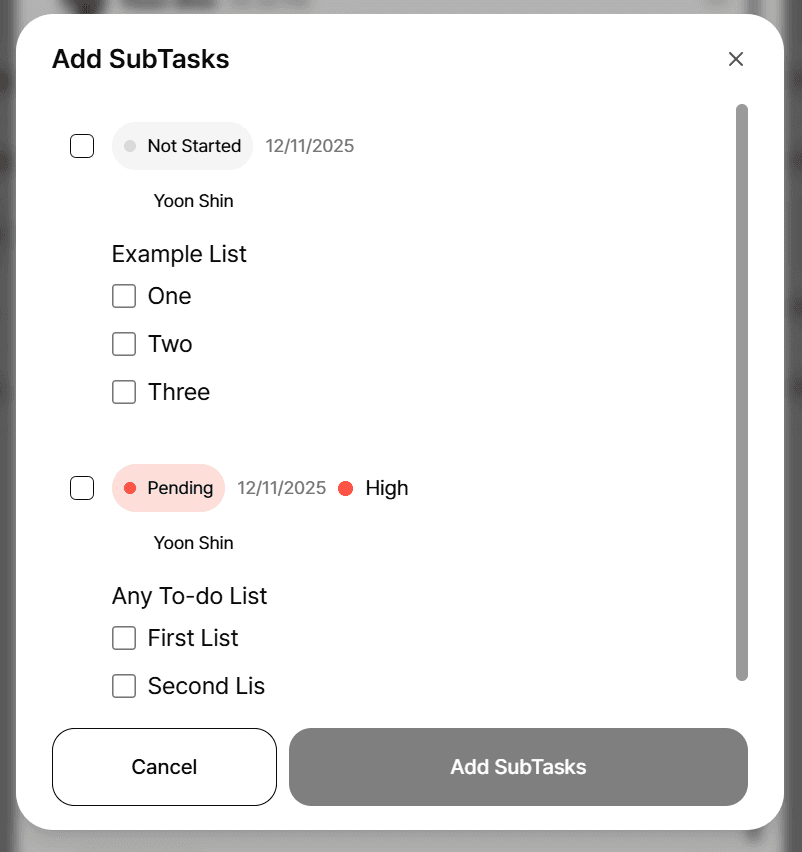
Board View & List View
The To-do system provides two main management views:
📌 Board View
Kanban-style workflow
To-do → In Progress → Review → Done
Drag & drop tasks
Perfect for team sprints and workflow tracking
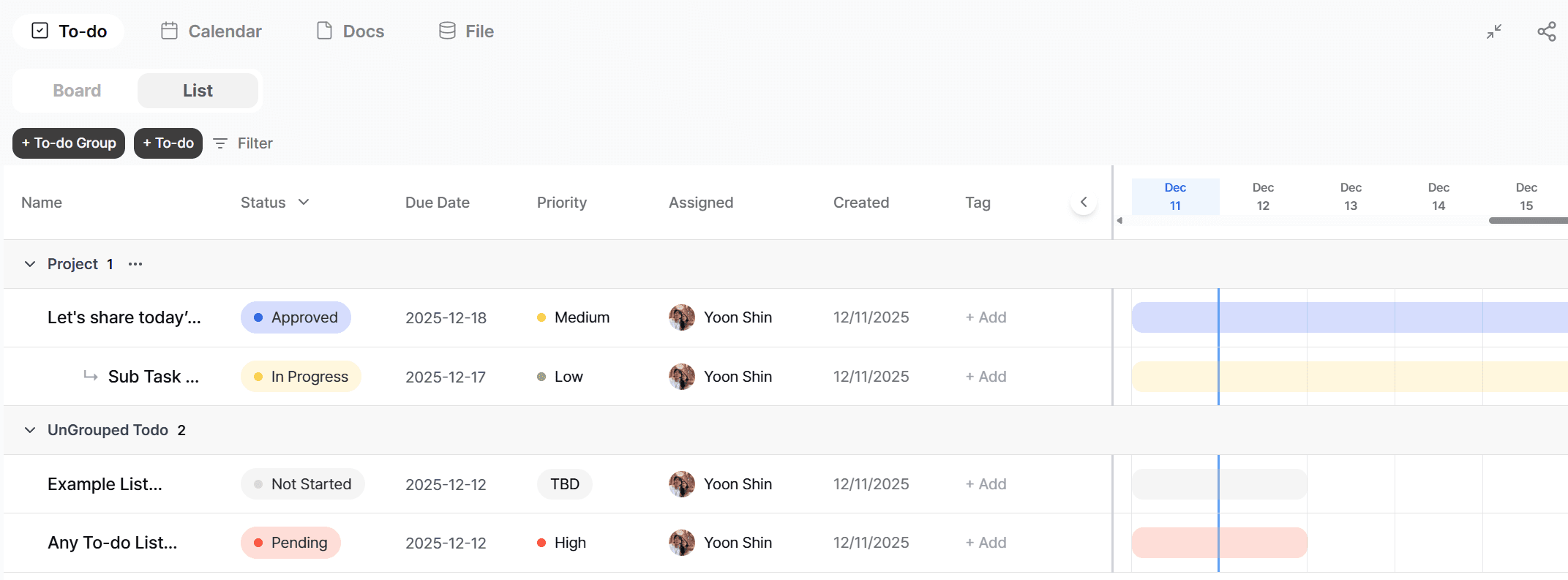
📋 List View
A structured list for sorting and filtering
Ideal for complex projects
Works like a table
Fast overview of all tasks across a Hub
Board View & List View
The To-do system provides two main management views:
📌 Board View
Kanban-style workflow
To-do → In Progress → Review → Done
Drag & drop tasks
Perfect for team sprints and workflow tracking
📋 List View
A structured list for sorting and filtering
Ideal for complex projects
Works like a table
Fast overview of all tasks across a Hub
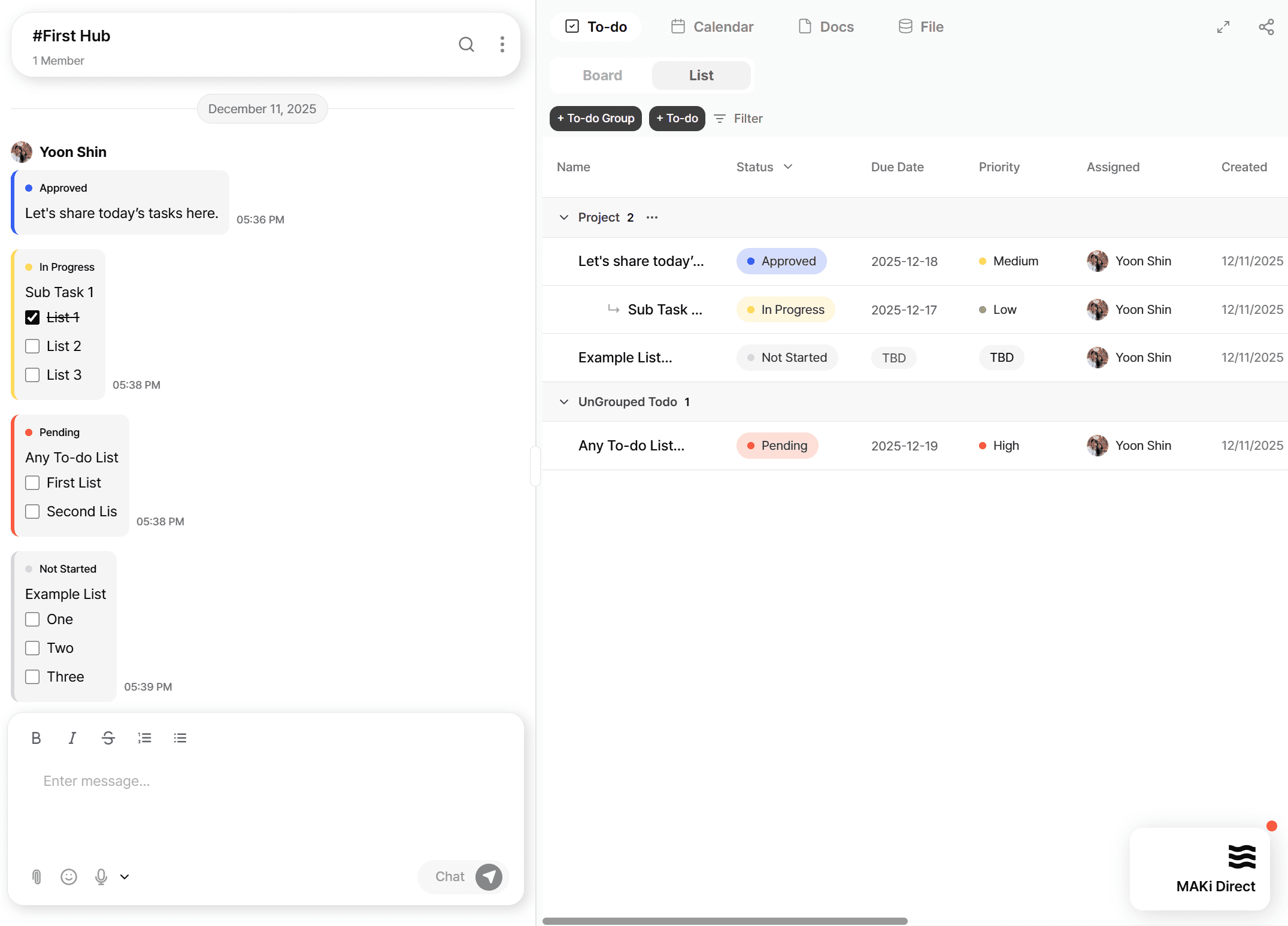
List View Includes a Gantt Chart
List View can be expanded into a Gantt-style timeline, allowing you to:
Visualize tasks over time
Understand dependencies
See delays or overlapping schedules
Quickly adjust dates
This replaces the need for tools like Asana Timeline or ClickUp Gantt.
List View Includes a Gantt Chart
List View can be expanded into a Gantt-style timeline, allowing you to:
Visualize tasks over time
Understand dependencies
See delays or overlapping schedules
Quickly adjust dates
This replaces the need for tools like Asana Timeline or ClickUp Gantt.
Everything Is Created Automatically — With One Click
MAKi removes the friction found in most collaboration tools.
You see a message in chat
You click Convert to To-do
MAKi automatically generates:
The task
Its position in the Data Bucket
Its appearance in the Board
Its appearance in the List
Its appearance in the Calendar
Its underlying execution links
Everything Is Created Automatically — With One Click
MAKi removes the friction found in most collaboration tools.
You see a message in chat
You click Convert to To-do
MAKi automatically generates:
The task
Its position in the Data Bucket
Its appearance in the Board
Its appearance in the List
Its appearance in the Calendar
Its underlying execution links
There is no manual creation, no setup, no duplicate writing.
One click = a full task system is instantly updated.
There is no manual creation, no setup, no duplicate writing.
One click = a full task system is instantly updated.
Turn any message into a task and manage all tasks from the right-side Data Bucket.
MAKi’s To-do system is built on a simple principle:
“If it was discussed, it can be executed.”
Every actionable message in Chat becomes a structured To-do, and all tasks flow into one central location
the Data Bucket on the right side of your screen.
Turn any message into a task and manage all tasks from the right-side Data Bucket.
MAKi’s To-do system is built on a simple principle:
“If it was discussed, it can be executed.”
Every actionable message in Chat becomes a structured To-do, and all tasks flow into one central location
the Data Bucket on the right side of your screen.
Turn any message into a task and manage all tasks from the right-side Data Bucket.
MAKi’s To-do system is built on a simple principle:
“If it was discussed, it can be executed.”
Every actionable message in Chat becomes a structured To-do, and all tasks flow into one central location
the Data Bucket on the right side of your screen.
Stop losing work in chat.
Start organizing it.
Join the teams who turned their conversations
into their competitive advantage
Set up in 5 minutes. Cancel anytime.
Get Started Free - No Credit Card